
Compatibility mode
Compatibility mode lets you play an old Spring game on a current engine. Many Spring games are one or two decades old. Their Lua calls functions the engine has since removed, their unit files set tags it no longer reads, and their models are in Total Annihilation's .3do format.
With compatibility mode on, coilbox writes a second game that loads the old one and adds fixes on top. It launches that game in place of the old one. The old game's files are never changed.
Each game has its own switch, and coilbox builds nothing until you turn it on.
Check a game
- Open Library > Games and select the game.
- Select the Compatibility tab.
The tab shows a spinner while coilbox checks the game. If it finds nothing, the tab says so and the game needs no switch.
An archive's page in Library > Archives has a Convert models button for a game with .3do models. It opens this tab.
Read the report
Each row is one kind of finding. The number on the right is how many there are, where counting them means something. A row with an arrow opens to show the details, such as each file and line behind a count of Lua calls.
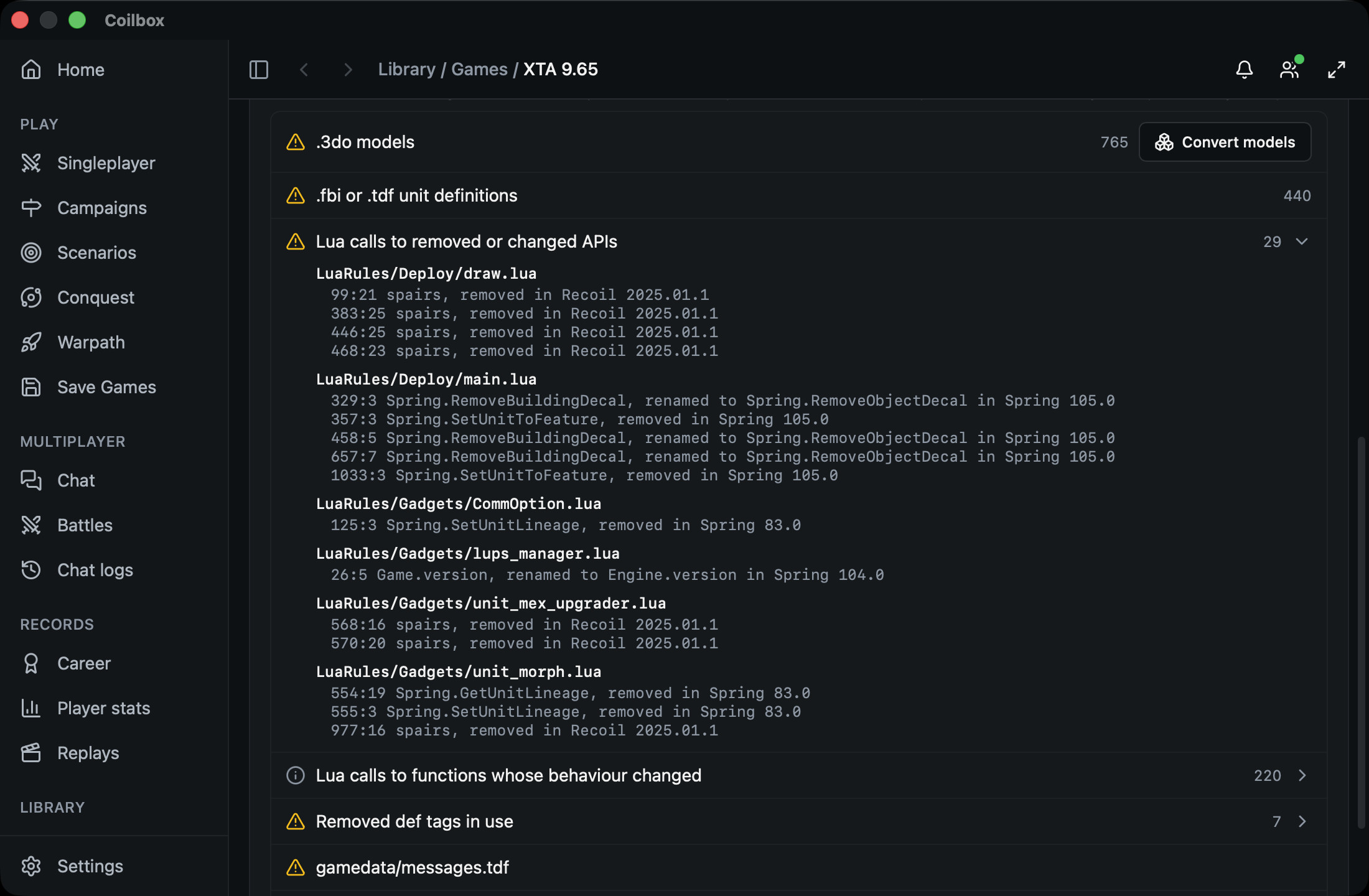
A warning triangle is a problem: something the current engine no longer does. An info icon is worth knowing and changes nothing on its own.
Engine versions in the details name the engine as it was called at the time. Up to 105.0 that is Spring, for example "removed in Spring 105.0". From 105.1.1 on it is Recoil.
Problems
| Row | What it means | What compatibility mode does |
|---|---|---|
| .3do models | Models in Total Annihilation's format, with a count | Converts them to .s3o and points the game's units, features and weapons at the copies. A model the game also ships as an .s3o of the same name is left as the game has it, so the build can convert fewer than this row counts. The row's Convert models button opens a drawer that converts the models on their own |
| .fbi or .tdf unit definitions | Unit files in the old text formats | Leaves the files alone. The def fixes still run on the units they define |
| Lua calls to removed or changed APIs | Calls to functions the engine removed or renamed. The details give each file, line and the change | Puts back the functions listed in What it changes. Calls to anything else stay broken |
| Removed def tags in use | Unit or weapon definitions that set a tag the engine stopped reading, with the units that set it | Puts back the tags listed in What it changes |
| No luaui/widgets folder, or No luaui folder | The game ships no widgets of its own | Nothing |
| modinfo.tdf instead of modinfo.lua | The game describes itself in the old file format | Nothing |
| gamedata/messages.tdf | The file that says how a team's death is announced. The engine stopped reading it in Spring 95.0 | A gadget reads it again |
Information
| Row | What it means |
|---|---|
| Lua calls to functions whose behaviour changed | Calls to a function whose arguments changed. Only some calls are affected, such as one that leaves an argument out |
| Compatibility gadgets a build turns on | The fix gadgets that would run for this game, with the units or weapons each would act on. The aircraft gadget's list can name planes it then leaves alone, because it checks more when the game loads than the report can. The build result can name a gadget this row leaves out |
| Dependencies not scanned for Lua | Games this one depends on that are not installed, so their Lua was not checked |
| Could not check everything | A read failed. The details say which |
Maps
A map's page has a Compatibility section on its page rather than a tab of its own. It lists things such as SM3 maps, .3do feature models and .pcx textures. Compatibility mode does not change maps, and a map page has no switch.
Turn it on
- On the game's Compatibility tab, turn on Compatibility mode.
- Wait for the build. It shows Building, then a count of the models converted so far.
When the build ends, the section shows the folder it wrote and what is in it: how many models were converted, how many prelude functions and def overrides were written, and which gadgets are enabled. If something could not be done, a line under that says why. This result goes when you leave the page. The folder's name stays.
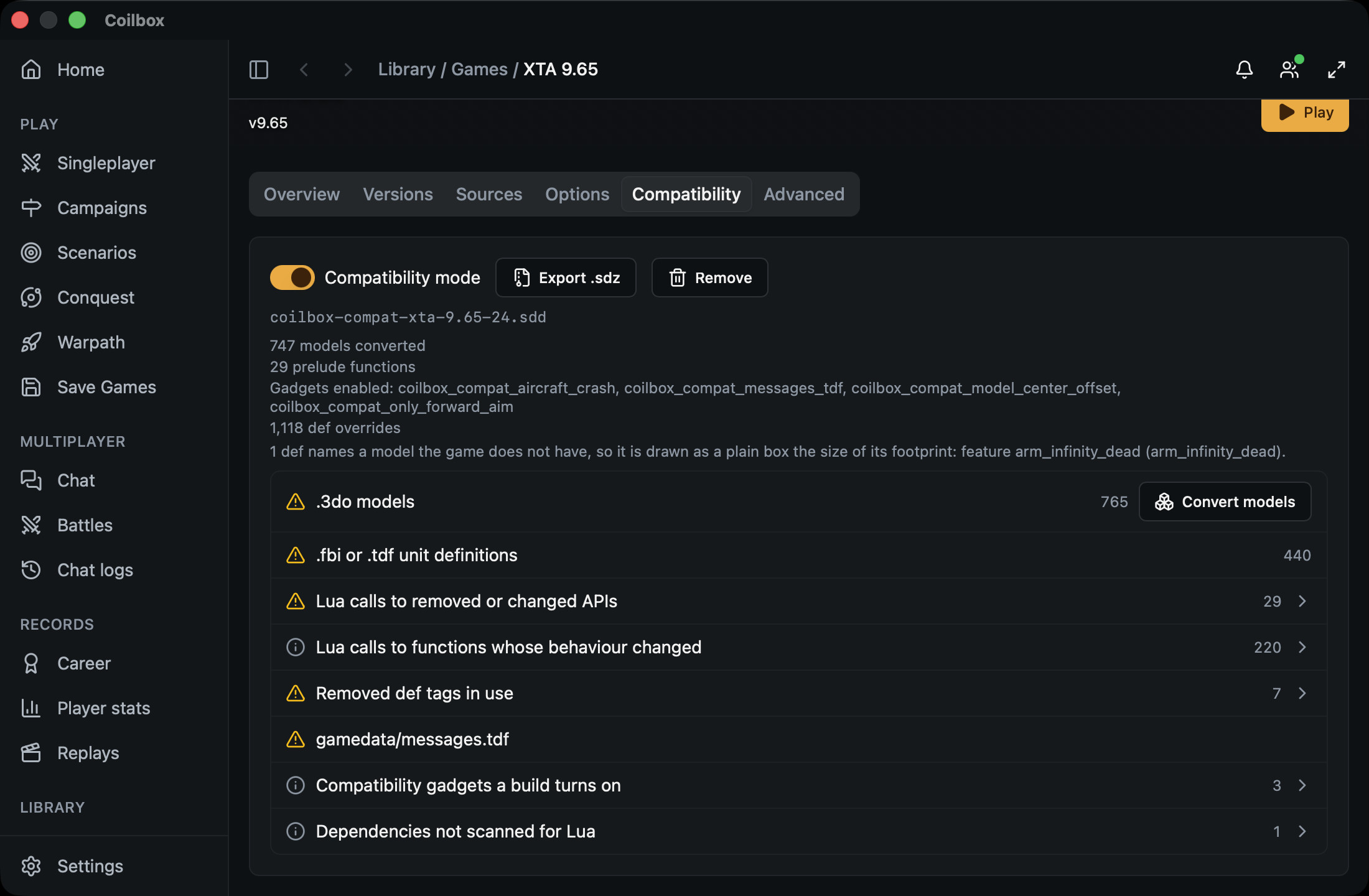
Export .sdz saves a copy of the folder as one .sdz file, in a place you choose.
The switch cannot be used until coilbox has read the game's checksum, which takes a moment after the page opens.
The new game is a folder in the games folder of your content folder. Its name is coilbox-compat-, the old game's file name in lower case without its extension, and the compatibility version. For example, xta-9.65.sd7 at version 24 becomes coilbox-compat-xta-9.65-24.sdd.
After a rescan, the old game's page has a Mutators tab that lists the folder, for example as XTA 9.65 (compat 24). To rescan, select Rescan on Library > Games. The games grid and the places where you pick a game to play do not list it. Pick the old game, and coilbox uses the compatibility version for you.
Play with it
With the switch on, these launch the compatibility version in place of the old game:
- A singleplayer battle.
- Play when you test a Unit tweaks project.
- Campaigns, Galactic conquest and Warpath.
- Scenarios.
- The unit builder's test game.
Refight from a replay still launches the old game without fixes, even with the switch on.
If the compatibility version is missing or out of date, the launch stops and says why, for example "Compatibility mode is on for XTA 9.65, but its mutator is out of date". Coilbox never launches the old game without its fixes while the switch is on. Rebuild it from the game's page.
Rebuild after an update
A Rebuild button appears beside the switch when the folder no longer matches what coilbox would build now. The line under the switch says why:
- "built from compatibility version 4, now 5" means a newer coilbox has more fixes.
- "written by an older coilbox" means a newer coilbox writes the files differently.
- "the game has changed since it was built" means the old game's archive is not the one it was built from.
- "the palette its models take their colours from has changed" means the Total Annihilation
palette.palthe models were coloured from is different now, or has gone. That file can come from the engine or another archive rather than the game, so a new engine can cause it. - "its record of what it was built from is missing" means the folder's record file is gone or unreadable.
So after you update coilbox, a game with the switch on may refuse to launch until you rebuild it.
Rebuild builds the newest version and leaves the switch as it was. A newer version is a new folder, and the older folder stays until you select Remove.
Turn it off or remove it
Turning the switch off sends launches back to the old game. The folder is kept, so turning it on again needs no build if nothing has changed.
Remove deletes every compatibility folder coilbox built for the game and turns the switch off. It never touches the old game.
Multiplayer
Every player in a battle needs the same compatibility version of the game. Coilbox writes the same files on every computer from the same game and the same version. So nobody downloads a compatibility version. Each player's coilbox builds its own.
When you join a battle whose game is named like XTA 9.65 (compat 5):
- If you do not have the old game, coilbox gets it as it would any missing game. See Get the map and game.
- If you have the old game, coilbox builds version 5 for you, and the room shows Building and a count of the models converted until it is done. Your own switch for the game does not change.
- If your coilbox is newer than the host's, it builds the host's older version.
- If the host's coilbox is newer than yours, the room says "Host is on a newer coilbox" and you cannot start. Update coilbox opens the updater.
- If the build fails, the room says why and offers Try again.
So everyone needs the same version of coilbox as the host, or a newer one.
Host a battle
- Turn on the game's switch.
- Open the Host a battle or Host on LAN form and choose the game.
- Under the game, keep Compatibility mode selected. The form names the version the battle will use, such as
XTA 9.65 (compat 24). Select Original game to host the old game instead. - If the form says "Not built" or "Out of date", select Build or Rebuild and wait for the count of models. You cannot start until the compatibility version is current.
If the game's switch is off, the form offers only the old game. Quick room always opens on the old game.
Your battle room shows the line "Players without coilbox need the .sdz". Export .sdz beside it saves a file you can send them. It goes in their games folder.
What it cannot fix
- Only what is listed in What it changes. The report can show Lua calls and def tags that have no fix.
- Maps.
- A game that never reaches
gamedata/defs_post.luagets its converted models and def fixes throughgamedata/weapondefs.luainstead. If it ships that file too, or its owngamedata/defs.lualoads its weapon defs before its unit or feature defs, it gets no converted models and none of those def fixes. - A game that ships its own
gamedata/weapondefs_post.lua, or whose owngamedata/weapondefs.luanever loads it, gets none of the weapon def fixes. - A
.3doface that names a colour from the Total Annihilation palette is drawn flat grey when nopalette.palcan be found.
When a model or def fix is skipped, the build result under the switch says which and why.
If one of the fixes fails while the game runs, the game still loads. The engine's log has a line that starts "coilbox compat fix", with the fix's name and the error.
What it changes
This is compatibility version 24, the newest. It changes nothing in the game. It adds a compat/coilbox-licence/ folder with the licence notice for the Lua coilbox writes.
Lua functions it puts back:
Spring.GetUnitTravelandSpring.SetUnitTravel, removed in Spring 105.0. They work again, and keep their values per unit.Spring.SetUnitToFeature, removed in Spring 105.0.Spring.SetUnitLineageandSpring.GetUnitLineage, last in Spring 0.82.7.1. They work again, and keep each unit's lineage, but a team's units no longer die with its lineage root.gl.Smoothing, removed in Spring 104.0. It does nothing.Spring.SetSunParametersandSpring.SetSunManualControl, removed in Spring 104.0. They do nothing.Spring.UpdateInfoTexture, removed in Spring 99.0. It does nothing and returns false.Spring.MakeFont, last in Spring 0.81.2.1. It makes no font and returns nil.snext,spairsandsipairs, removed in Recoil 2025.01.1. In a game's unsynced gadgets they arenext,pairsandipairsagain, as they were from Spring 97.0.Spring.GetHasLag, removed in Spring 105.0. It says whether the game has fallen behind, which the engine now gives as the 4th result ofSpring.GetGameState.Spring.GetCommandQueue,Spring.GetUnitCommandsandSpring.GetFactoryCommandswith no count, which Spring 105.0 made an error. Called with a unit alone, they return its whole queue again. A call that gives a count is unchanged.LOG, for a game whose own gadget handler does not give it to its gadgets. The engine'sunit_scriptgadget, which Complete Annihilation includes, has needed it since Spring 89.0.1.
Call-ins whose arguments moved:
UnitDamaged, changed in Spring 95.0, andAllowCommand, changed in Spring 105.0. The game's handlers get the arguments in the old order. Coilbox reads the game's Lua first, and leaves this out for a game whose handlers already take the new order.Spring.GetTeamInfo, changed in Spring 105.0. The game gets the team's custom keys 7th and its income multiplier 8th, as before. Coilbox leaves this out for a game whose Lua already reads them the new way round.Spring.GetSelectedUnitsCountsandSpring.GetSelectedUnitsSorted, whose tables lost theirnkey in BAR105 1544. The tables have it again, holding the number of unit types selected, and are all the functions return, as before. Coilbox leaves this out for a game whose Lua already takes that number as the second result.GameFramein a game's unsynced gadgets, which the engine has run since Spring 97.0. A gadget that also uses itsGameFramefunction as a message from its synced half, as Complete Annihilation's nano spray does, no longer gets the call-in. Other unsynced gadgets still do.
Values Lua can read again:
CMD.AISELECTandCMD.SET_WANTED_MAX_SPEED, removed in Recoil 2025.01.1 and Spring 105.0. The names are back with their old numbers, 30 and 70. An order given with either does nothing.- The
nkey that Spring 83.0 took off lists such as the unitsSpring.GetTeamUnitsreturns, and off each unit'sweaponsinUnitDefs. It holds how many entries the list has. A game that walks the list withpairsdoes not see it. Theweaponsone is in widgets and gadgets alike, and a walk over a unit def withud:pairs()still ends. WeaponDefs[id].areaOfEffect,maxVelocityandonlyTargetCategories, which Lua lost in Spring 87.0. Widgets and gadgets can read them again.onlyTargetCategorieslists every category, as it did for every weapon in 86.0.
Values the engine now keeps differently:
Spring.SetUnitRulesParam, and the game, team and feature versions, changed in Spring 105.0. A number written as text, such as"30", is stored as a number again, so the game reads back a number it can compare.
Files the engine no longer installs as they were:
LuaUI/main.lua, the basic widget handler beside the engine, which Recoil 2025.01.1 changed. A game whose ownLuaUI/main.luaincludes that file, as Spring 1944 does, skips the include, so the game's own widget handler runs on its own.fontHandlerandwidgetHandler:InTweakMode, which that basic widget handler gave widgets on Spring 104.0. Widgets run by a game's ownLuaHandlerhandler get them back.fontHandler.UseDefaultFontdoes nothing, andInTweakModereturns false, as that handler has no tweak mode.
Gadgets, which each decide when the game loads whether the game needs them:
coilbox_compat_aircraft_crash. A plane that is shot down falls out of the sky, as it did before Spring 83.0, instead of exploding where it was hit. It does nothing for a plane whose script crashes it. It also does nothing in a game that crashes planes itself, or whose own gadgets call a function that engines before Spring 83.0 did not have.coilbox_compat_only_forward_aim. A weapon that only fires forward fires once its target is in front of it, as it did before Spring 105.0.coilbox_compat_messages_tdf. A team's death is announced with the lines in the game'sgamedata/messages.tdf, as it was before Spring 95.0.coilbox_compat_model_center_offset. A unit'smodelCenterOffsetmoves its middle again, as it did before Spring 89.0.
Unit and weapon definitions:
- The
commandertag, removed in Spring 85.0, is copied tocustomParams.iscommander, which games made since read. modelCenterOffset, removed in Spring 89.0, is copied to the unit's custom parameters for the gadget above.- A bomb's burst is worked out from its reload time as it was before Spring 92.0, unless the weapon sets
manualBombSettingsto true. areaOfEffectandmaxVelocity, which Lua lost in Spring 87.0, are kept in each weapon's custom parameters under those names in lower case.- A unit whose
iconTypenames an icon the game'sgamedata/icontypes.luadoes not have reads asdefaultin Lua, as it did before Recoil 2025.06.07. The engine draws it with the default icon either way. - A unit, feature or weapon whose model is not in the game is drawn as a plain grey box the size of its footprint, because the engine stops loading a game on any model it cannot find. A wreck keeps its metal and still blocks the ground it covers. The build result names each one. A name close to a model the game has is not taken for it, so XTA's
arm_infinity_deadgets a box even though the game hasarm_infinite_DEAD.
For how fixes are added and why a fix never changes once it ships, see Compatibility mode fixes.